面试 Vue 时,路由几乎必问:有哪两种模式?区别是什么?再往下就会问实现原理,甚至让你手写一个。 常见答案是 hash 和 history。hash 吃的是 URL 里 # 后面的锚点;history 吃的是 history.pushState / replaceState。
hash 从 #a 切到 #b 时页面不刷新,只换锚点。 history 则改路径本身,需要服务端把所有前端路由都回落到同一张 HTML,否则直开 /about 会 404。原文把 API 写成 putState,标准名字是 pushState。

一、两种模式对比
|
hash |
history |
| URL 形态 |
example.com/#/home |
example.com/home |
| 切换手段 |
hashchange / 改 location.hash |
pushState / replaceState |
| 刷新直开子路径 |
一般没问题,# 后不发给服务端 |
需要服务端 fallback |
| 观感 |
带 #,略「老」 |
更像真实路径 |
二、手写 hash 路由
index.html 里,链接相当于 router-link,#router-view 相当于 router-view:
<body>
    <!-- 相当于 router-link -->
    <a href="./#home">首页</a> | <a href="./#about">关于我们</a> | <a href="./#introduce">公司介绍</a>
    <!-- 路由输出 相当于router-view -->
    <div id="router-view"></div>

    <script src="./js/router.js"></script>
</body>
router.js 的结构刻意贴近 Vue Router:路由表 + 根据 hash 找组件 + 监听 hashchange:
const importCom = (id, text) => {
	const el = document.createElement('div')
	el.id = id
	el.innerHTML = text
	return el
}

const routes = [
	{ path: 'home', component: importCom('home', '欢迎光临公司首页') },
	{ path: 'about', component: importCom('about', '以客户为中心,以奋斗者为本!') },
	{ path: 'introduce', component: importCom('introduce', '互联网知名企业') },
	{ path: 'notFound', component: importCom('notFound', '页面不能找到!') },
]

const router = () => {
	const url = location.hash.slice(1) || 'home'
	const rootEle = document.querySelector('#router-view')
	rootEle.innerHTML = ''
	const childEle = routes.find(item => item.path == url)?.component
	rootEle.appendChild(childEle ? childEle : routes.find(item => item.path == 'notFound')?.component)
}

router()
window.addEventListener('hashchange', router)
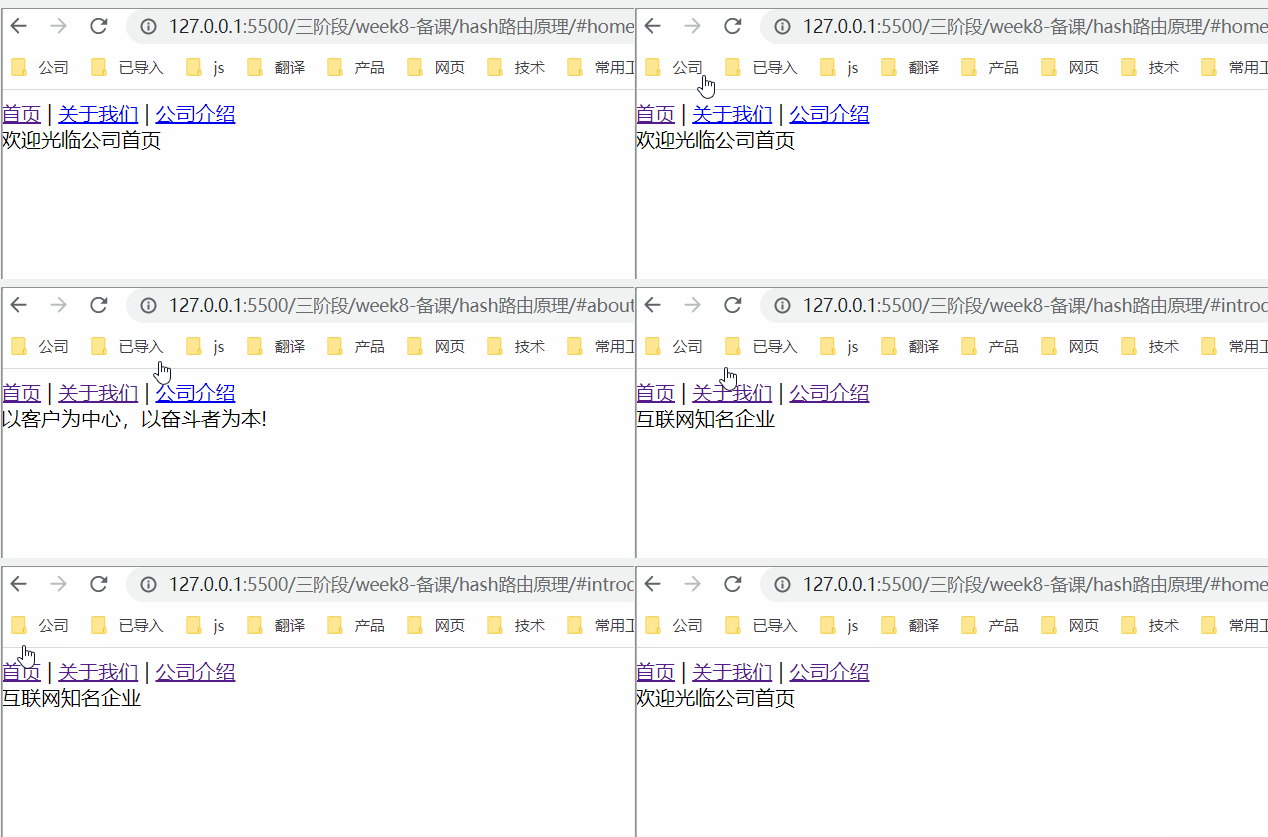
浏览器打开 index.html 即可验证切换:
三、手写 history 路由
链接不再带 #。点击时 preventDefault,再用 history.pushState 改路径并调用 router()。 别忘了执行 router(),否则地址变了视图不变。
<body>
    <!-- 相当于 router-link -->
    <nav id='nav'>
       <a href="./home">首页</a> | <a href="./about">关于我们</a> | <a href="./introduce">公司介绍</a>
    </nav>
    <!-- 路由输出 相当于router-view -->
    <div id="router-view"></div>

    <script src="./js/router.js"></script>
</body>
const importCom = (id, text) => {
	const el = document.createElement('div')
	el.id = id
	el.innerHTML = text
	return el
}

const routes = [
	{ path: 'home', component: importCom('home', '欢迎光临公司首页') },
	{ path: 'about', component: importCom('about', '以客户为中心,以奋斗者为本!') },
	{ path: 'introduce', component: importCom('introduce', '互联网知名企业') },
	{ path: 'notFound', component: importCom('notFound', '页面不能找到!') },
]

const router = () => {
	const url = location.pathname.slice(1) || 'home'
	const rootEle = document.querySelector('#router-view')
	rootEle.innerHTML = ''
	const childEle = routes.find(item => item.path == url)?.component
	rootEle.appendChild(childEle ? childEle : routes.find(item => item.path == 'notFound')?.component)
}

const navEle = document.querySelector('#nav')
navEle.addEventListener('click', function (e) {
	if (e.target.tagName == 'A') {
		e.preventDefault()
		const href = e.target.getAttribute('href').slice(1)
		history.pushState(null, `页面标题`, href)
		// history.replaceState(null, `页面标题`, href)
		router()
	}
})
四、还有 memory 模式
React 里也能见到 memory 路由:不依赖浏览器 URL,适合非浏览器或 App 内 WebView。优点是不必刷新、不必暴露路径;缺点是不能分享带 URL 的链接,也不支持浏览器前进后退,只对当前会话有效。 实现上可把 history 方案里的路径存储换成 localStorage。
相关阅读:两种前端路由(hash模式和history模式)实现原理解析及区别。
一句话总结:hash 听 hashchange,history 听 pushState:两者都是「改地址但不整页刷新」,差在 URL 形态和对服务端的要求。