移动端列表要做上拉加载、下拉刷新,原生 overflow 往往不够用。better-scroll 专门解决滚动场景,核心借鉴 iscroll,API 基本兼容,又做了扩展和性能优化。
它基于原生 JS,不依赖框架。编译后 63kb,压缩 35kb,gzip 约 9kb。下面用 Vue 接一套下拉刷新 + 上拉加载。资料:插件地址、引用文章。
| 能力 |
怎么配 |
注意 |
| 初始化 |
new BScroll(wrapper, options) |
外层 overflow:hidden,内层比外层高 |
| 下拉刷新 |
scroll / touchEnd,pos.y > 30 |
刷新后 scroll.refresh() |
| 上拉加载 |
pos.y < maxScrollY - 30 |
concat 数据后再 refresh |
| 点击 |
click: true |
移动端默认可能吃掉 click |
一、什么是 better-scroll
重点解决移动端(已支持 PC)各种滚动需求。结构通常是:外层 wrapper 固定高度并 hidden,内层 content 撑开,插件监听 touch 做位移。
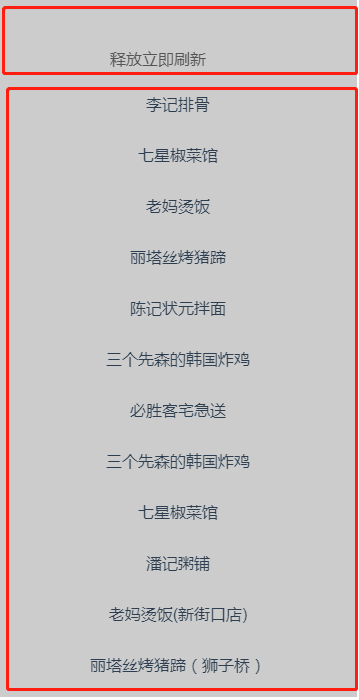
better-scroll的滚动原理
二、安装与引入
1. 安装
先在 package.json 加入依赖,再用 npm 安装:
npm install better-scroll --save-dev
2. 引入
在需要滚动的组件里引入。新版本要用 @better-scroll/core:
import BScroll from 'better-scroll'
import BScroll from '@better-scroll/core' // 新版本需这样引用
三、Vue 上拉加载、下拉刷新
模板:外层 wrapper 挂 ref,内层放顶部提示、列表、底部提示。刷新成功用一个 alert 层。
<template>
    <div class="tabbar">
        <div class="wrapper" ref="wrapper">
            <div class="bscroll-container">
                <!-- 刷新提示信息 -->
                <div class="top-tip">
                    <span class="refresh-hook">{{pulldownMsg}}</span>
                </div>
                <!-- 内容列表 -->
                <ul class="content">
                    <li v-for="item in data">{{item}}</li>
                </ul>
                <!-- 底部提示信息 -->
                <div class="bottom-tip">
                    <span class="loading-hook">{{pullupMsg}}</span>
                </div>
            </div>
        </div>

        <!-- alert提示刷新成功 -->
        <div class="alert-hook" :style="{display: alertHook}">刷新成功</div>
    </div>
</template>
$nextTick 里 new BScroll。probeType: 1 会截流派发 scroll;2 实时派发;3 在 swipe 时仍实时派发。click: true 才会派发点击。
<script>
import BScroll from "better-scroll"
const count = 1
    export default {
        data(){
            return {
                data: [0,1,2,3,4,5,6],
                pulldownMsg: '下拉刷新',
                pullupMsg: '加载更多',
                alertHook: 'none'
            }
        },
        methods: {
            getData() {
                return new Promise(resolve => {  //模拟数据请求
                    setTimeout(() => {
                        const arr = [];
                        for (let i = 0; i < 20; i++) {
                            arr.push(count++)
                        }
                        resolve(arr)
                    }, 1000)
                })
            },
            refreshalert(){   //刷新成功提示
                this.alertHook = 'block';
                setTimeout(()=>{
                    this.alertHook = 'none'
                },1000)
            }
        },
        created(){
            const that = this;
            this.$nextTick(() => {
                    this.scroll = new BScroll(this.$refs.wrapper,{       //初始化better-scroll
                        probeType:1,   //1 滚动的时候会派发scroll事件,会截流。2滚动的时候实时派发scroll事件,不会截流。 3除了实时派发scroll事件,在swipe的情况下仍然能实时派发scroll事件
                        click: true   //是否派发click事件
                    })
                    // 滑动过程中事件
                    this.scroll.on('scroll',(pos)=>{
                        if(pos.y > 30){
                            this.pulldownMsg = '释放立即刷新'
                        }
                    });
                    //滑动结束松开事件
                    this.scroll.on('touchEnd',(pos) =>{  //上拉刷新
                        if(pos.y > 30){
                            setTimeout(()=>{
                                that.getData().then((res)=>{
                                    //刷新数据
                                    that.data = res;
                                    //恢复刷新提示文本值
                                    that.pulldownMsg = '下拉刷新'
                                    //刷新成功后提示
                                    that.refreshalert();
                                    //刷新列表后,重新计算滚动区域高度
                                    that.scroll.refresh();
                                })
                            },2000)
                        }
                        else if(pos.y<(this.scroll.maxScrollY - 30)){   //下拉加载
                            this.pullupMsg = '加载中。。。';
                            setTimeout(()=>{
                                that.getData().then((res)=>{
                                    //恢复文本值
                                    that.pullupMsg = '加载更多';
                                    that.data = this.data.concat(res);
                                    that.scroll.refresh();
                                })
                            },2000)

                        }
                    })
            })
        }
    }
</script>
样式要点:wrapper 固定高度并 overflow:hidden;顶/底提示用绝对定位探出可视区。
//css
    .wrapper{
        width: 100%;
        height: 300px;
        background: #ccc;
        overflow: hidden;
        position: relative;
    }

    li{
        line-height: 50px;
        border-bottom: 1px solid #ccc;
        text-align: center;
    }

    /* 下拉、上拉提示信息 */
    .top-tip{
        position: absolute;
        top: -40px;
        left: 0;
        z-index: 1;
        width: 100%;
        height:40px;
        line-height:40px;
        text-align:center;
        color: #555;
    }

    .bottom-tip{
        width: 100%;
        height: 35px;
        line-height: 35px;
        text-align: center;
        color: #777;
        background: #f2f2f2;
        position: absolute;
        bottom: -35px;
        left: 0;
    }


    /* 全局提示信息 */
    .alert-hook{
        display: none;
        position: fixed;
        top: 62px;
        left: 0;
        z-index: 2;
        width: 100%;
        height: 35px;
        line-height: 35px;
        text-align: center;
        color: #fff;
        font-size: 12px;
        background: rgba(7, 17, 27, 0.5);
    }
参考 iScroll
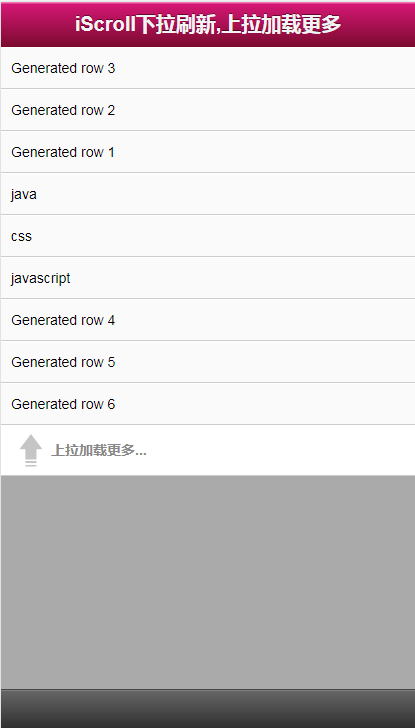
参考-实现原理分析
一句话总结:better-scroll 要求「外层裁剪、内层撑开」;下拉看 pos.y,上拉看 maxScrollY,数据变了务必 refresh() 重算高度。