


Android界面显示与LayoutInflater
LayoutInflater 主要用来加载布局。刚接触 Android 时可能对它不熟,因为加载布局通常在 Activity 里调用
setContentView()就完成了。其实这个方法内部也是用 LayoutInflater 把 XML 变成 View 树。
一、inflate 的两种常见写法
第一步,拿到 Inflater:
第二步,加载布局:
签名:public View inflate(int resourceId, ViewGroup root, boolean attachToRoot)
| 参数组合 | 行为 |
|---|---|
| root 非空,attachToRoot = false | 从 root 得到由 layout_width / layout_height 组成的 LayoutParams,赋给加载出的 View,但不挂到 parent |
| root 非空,attachToRoot = true | 把加载的视图作为子视图添加到 root |
| root = null | 直接返回创建的视图 |
二、Activity 窗口由哪两部分组成
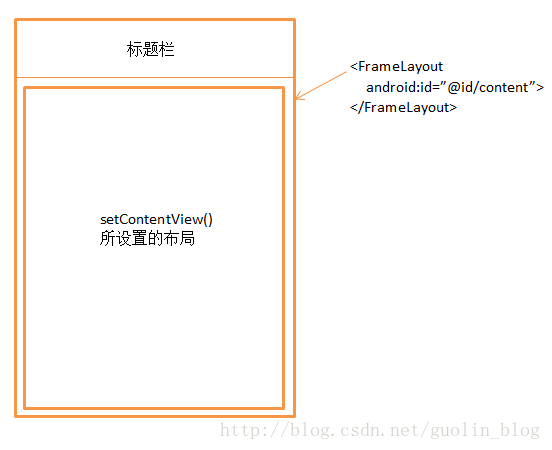
任何一个 Activity 里显示的界面,其实主要都由两部分组成:标题栏和内容布局。
标题栏是很多界面顶部那一条,可以在代码里控制显隐。内容布局是一个 FrameLayout,这个布局的 id 叫 content。调用 setContentView() 传入的布局,其实是放进这个 FrameLayout 里——所以方法名叫 setContentView,而不是 setView。
Activity 窗口组成如下,便于对照:
一句话总结:setContentView 只是 LayoutInflater 的快捷方式,真正把 XML 变成 View,并塞进窗口里那个 id 为 content 的 FrameLayout。
转载请注明来源:Android界面显示与LayoutInflater

周sir
我是周sir,这是我的博客。致力于分享我学会的技术和优秀的文章。微信公众号 “周sir专栏” 欢迎大家关注。
你可能也喜欢
SurfaceView介绍
Android广告栏实现过程
仿QQ,微信图片选择上传

Android View总结