Notification 是在 App 常规 UI 之外提示事件的交互:用户可以在用别的 app 时看到通知,方便时再点进去。下面覆盖 Builder 发布、更新与移除、从通知启动 Activity 时保留返回栈、进度条通知,以及 RemoteViews 自定义界面。

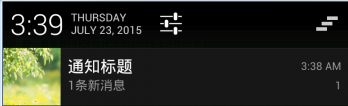
一、建立一个 Notification
用 NotificationCompat.Builder 设 UI 特征和行为,再 notify(id, notification) 发布。notificationId 唯一标识这条通知。
NotificationCompat.Builder builder = new NotificationCompat.Builder(this);
builder.setSmallIcon(R.drawable.m4);
builder.setContentTitle("通知标题");
builder.setContentText("1条新消息");
builder.setTicker("收到1条新消息");
builder.setNumber(1);
builder.setAutoCancel(true);
builder.setDefaults(Notification.DEFAULT_ALL); // requires VIBRATE permission
builder.setWhen(System.currentTimeMillis());
builder.setSound(uri);

Intent intent = new Intent(this, BaseActivity.class);
PendingIntent pendingIntent = PendingIntent.getActivity(this, 0, intent, PendingIntent.FLAG_UPDATE_CURRENT);
builder.setContentIntent(pendingIntent);

NotificationManager mNotifyManager = (NotificationManager) getSystemService(NOTIFICATION_SERVICE);
Notification notification = builder.build();
int notificationId = 10;
mNotifyManager.notify(notificationId, notification);
PendingIntent 字面是「等待的、未决定的 Intent」。静态工厂 getActivity / getBroadcast / getService 分别对应跳 Activity、开广播、开服务,都必须传入 Intent 和 Context。
二、更新与移除
发布时用固定 ID:notify(ID, notification)。之后改 Builder 再 build(),用同一个 ID 发布即更新。
移除:创建时 setAutoCancel(true),点击即消失;或 cancel(notificationId) / cancelAll()。
三、从通知启动时保留导航
通知打开的是工作流中的某个 Activity 时,要在 manifest 声明层次,再用 TaskStackBuilder 组返回栈。
1. Manifest 层次:
<activity
    android:name=".MainActivity"
    android:label="@string/app_name" >
    <intent-filter>
        <action android:name="android.intent.action.MAIN" />
        <category android:name="android.intent.category.LAUNCHER" />
    </intent-filter>
</activity>
<activity
    android:name=".ResultActivity"
    android:parentActivityName=".MainActivity">
    <meta-data
        android:name="android.support.PARENT_ACTIVITY"
        android:value=".MainActivity"/>
</activity>
2. 为启动 Intent 创建返回栈:
int id = 1;
Intent resultIntent = new Intent(this, ResultActivity.class);
TaskStackBuilder stackBuilder = TaskStackBuilder.create(this);
stackBuilder.addParentStack(ResultActivity.class);
stackBuilder.addNextIntent(resultIntent);
PendingIntent resultPendingIntent =
        stackBuilder.getPendingIntent(0, PendingIntent.FLAG_UPDATE_CURRENT);

NotificationCompat.Builder builder = new NotificationCompat.Builder(this);
builder.setContentIntent(resultPendingIntent);
NotificationManager mNotificationManager =
        (NotificationManager) getSystemService(Context.NOTIFICATION_SERVICE);
mNotificationManager.notify(id, builder.build());
四、在通知里展示进度
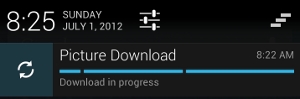
确定进度:setProgress(max, progress, false);不确定则第三个参数为 true。完成时 setProgress(0, 0, false) 去掉进度条。进度变化要不断改 progress 并再次 notify。
int id = 1;
mNotifyManager = (NotificationManager) getSystemService(Context.NOTIFICATION_SERVICE);
mBuilder = new NotificationCompat.Builder(this);
mBuilder.setContentTitle("Picture Download")
    .setContentText("Download in progress")
    .setSmallIcon(R.drawable.ic_notification);
new Thread(new Runnable() {
    @Override
    public void run() {
        int incr;
        for (incr = 0; incr <= 100; incr+=5) {
            mBuilder.setProgress(100, incr, false);
            mNotifyManager.notify(id, mBuilder.build());
            try {
                Thread.sleep(5*1000);
            } catch (InterruptedException e) {
                Log.d(TAG, "sleep failure");
            }
        }
        mBuilder.setContentText("Download complete")
                .setProgress(0,0,false);
        mNotifyManager.notify(id, mBuilder.build());
    }
}).start();

五、自定义 Notification 界面
RemoteViews 铺自定义布局,setOnClickPendingIntent 绑点击。
NotificationCompat.Builder mBuilder = new NotificationCompat.Builder(this);
mBuilder.setSmallIcon(R.drawable.m8);
mBuilder.setTicker("自定义通知,你有新消息");
mBuilder.setAutoCancel(true);

RemoteViews view = new RemoteViews(getPackageName(), R.layout.view_notificaction_layout);
mBuilder.setContent(view);

Intent intent = new Intent(this, RadioTabActivity.class);
PendingIntent pendingIntent = PendingIntent.getActivity(this, 01, intent, PendingIntent.FLAG_UPDATE_CURRENT);
view.setOnClickPendingIntent(R.id.player_notification, pendingIntent);

Notification notification = mBuilder.build();
int notificationId = 29;
NotificationManager mNotifyManager = (NotificationManager) getSystemService(NOTIFICATION_SERVICE);
mNotifyManager.notify(notificationId, notification);
| 能力 |
关键 API |
| 发布 / 更新 |
notify(同一 ID) |
| 点击跳转 |
PendingIntent.getActivity |
| 返回栈 |
TaskStackBuilder + parentActivityName |
| 进度 |
setProgress(max, progress, indeterminate) |
| 自定义 UI |
RemoteViews + setContent |
一句话总结:NotificationCompat.Builder 配 UI + PendingIntent,同一 ID 再 notify 即更新;要返回栈用 TaskStackBuilder,要进度反复 setProgress,要自定义界面用 RemoteViews。