Html5实例之婚庆界面
周sir |
2015年8月4日 |
Android UI界面 |
0 条评论 | 2080
广义的 HTML5 是 HTML、CSS 和 JavaScript 的组合,更适合移动 Web。两大特点:强化网页表现;补上本地数据库一类应用能力。本例先做婚庆 H5 页,再用 WebView 嵌进 Android。
一、效果与切图
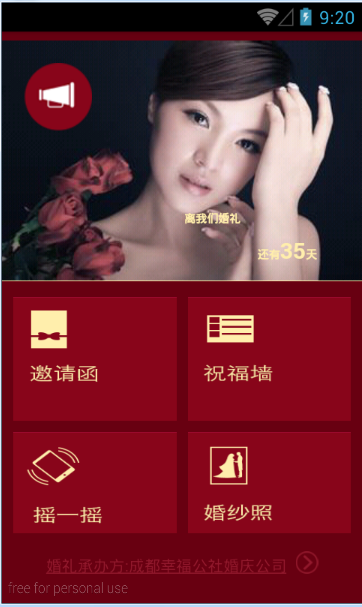
婚庆页面效果图:
按界面准备图片资源:

| 文件 |
职责 |
| weding.html |
顶栏倒计时、四宫格入口、页脚承办方 |
| mycss.css |
酒红底、绝对定位话筒与天数、浮动宫格 |
| activity_weding_layout.xml |
全屏 WebView |
| WedingActivity.java |
去标题栏后 loadUrl |
二、页面代码 weding.html
viewport 适配手机缩放;外层 #680011 酒红底。顶栏叠背景图和话筒,倒计时绝对定位在右下;中间四张入口图;页脚链到承办方「成都幸福公社婚庆公司」。
<html xmlns="http://www.w3.org/1999/xhtml">
<head>
    <title>婚庆主页</title>
    <meta http-equiv="content-type" content="text/html; charset=utf-8">
    <meta name="viewport" content="width=device-width, minimum-scale=1.0, maximum-scale=2.0,user-scalable=yes">
    <!--<meta name="viewport" content="width=640, initial-scale=0.5,maximum-scale=0.5" />-->
    <meta name="apple-mobile-web-app-capable" content="YES">
    <link rel="stylesheet" href="mycss.css" type="text/css" />
</head>
<body bgcolor="#680011">
    <div class="wrapcontain" style="width: 300px;padding: 10px;padding-top: 0px;margin: 0 auto;background-color:#680011;">
        <div class="imgTop">
            <img class="imgtop_bg" src="./img/index_top_bg.png" />
            <img class="imgtop_lb" src="./img/index_microphone.png"/>
            <h3 class="p3">
                <p id="sp11" class="sp1">离我们婚礼</p>
                <p class="sp2">还有<span class="sp3">35</span>天</p>
            </h3>
        </div>
        <div class="imgShow">
            <img src="./img/index_yaoqinghan.png" />
            <img src="./img/index_zhufuqiang.png" />
            <img src="./img/index_yaoyiyao.png" />
            <img src="./img/index_hunsha.png" />
        </div>
        <div class="footer">
            <a href="###">婚礼承办方:成都幸福公社婚庆公司<img src="./img/redRightarrow.png" /></a>
        </div>
    </div>
</body>
</html>
三、样式 mycss.css
.imgTop 相对定位;话筒绝对定位在左上;倒计时文字 #ffeeac 贴右下。宫格每张 145×110,左浮动。
.imgTop {
    width: 320px;
    margin-left: -10px;
    margin-right: -10px;
    min-height: 200px;
    position: relative;
    border-bottom: 1px solid #ffeeac;
}
.imgTop .imgtop_bg { width: 100%; }
.imgTop .imgtop_lb {
    margin-top: 10px;
    margin-left: 10px;
    position: absolute; left: 10px; top: 10px;
}
.p3 {
    width: 118px;
    height: 22px;
    padding: 30px;
    position: absolute;
    right: 10px;
    bottom: 0px;
}
.sp1 { font-size: 10px; color: #ffeeac; }
.sp2 { font-size: 10px; color: #ffeeac; text-align: right; }
.sp3 { font-size: 20px; }
.imgShow {
    width: 320px;
    height: 210px;
    overflow: hidden;
    margin-left: -10px;
    margin-top: 14px;
}
.imgShow img {
    width: 145px;
    height: 110px;
    display: inline-block;
    float: left;
    margin-left: 10px;
    margin-bottom: 10px;
}
.footer { margin-top: 14px; text-align: center; }
.footer a { color: #92192d; font-size: 14px; }
.footer img {
    width: 20px;
    display: inline-block;
    position: relative;
    top: 2px;
    margin-left: 8px;
}
四、嵌进 Android WebView
布局 activity_weding_layout.xml:
<?xml version="1.0" encoding="utf-8"?>
<LinearLayout xmlns:android="http://schemas.android.com/apk/res/android"
    android:layout_width="match_parent"
    android:layout_height="match_parent"
    android:orientation="vertical" >
    <WebView
        android:id="@+id/weding_webview"
        android:layout_width="match_parent"
        android:layout_height="match_parent" />
</LinearLayout>
WedingActivity 去掉标题栏后加载上面实现的网页:
public class WedingActivity extends Activity {
    private WebView mWebView;
    private String url = "http://www.warmtel.com/html/weding.html";

    @Override
    protected void onCreate(Bundle savedInstanceState) {
        super.onCreate(savedInstanceState);
        requestWindowFeature(Window.FEATURE_NO_TITLE);
        setContentView(R.layout.activity_weding_layout);
        mWebView = (WebView) findViewById(R.id.weding_webview);
        mWebView.loadUrl(url);
    }
}
一句话总结:H5 负责表现,Android 用全屏 WebView loadUrl 即可把婚庆页嵌进 App。
转载请注明来源:Html5实例之婚庆界面

我是周sir,这是我的博客。致力于分享我学会的技术和优秀的文章。微信公众号 “周sir专栏” 欢迎大家关注。