Android事件处理机制
周sir |
2015年9月8日 |
Android经验 |
0 条评论 | 2202
Android 事件处理更准确的说法是「分发、拦截、处理」。核心是三个方法:dispatchTouchEvent、onInterceptTouchEvent、onTouchEvent。
一、三个方法各管什么
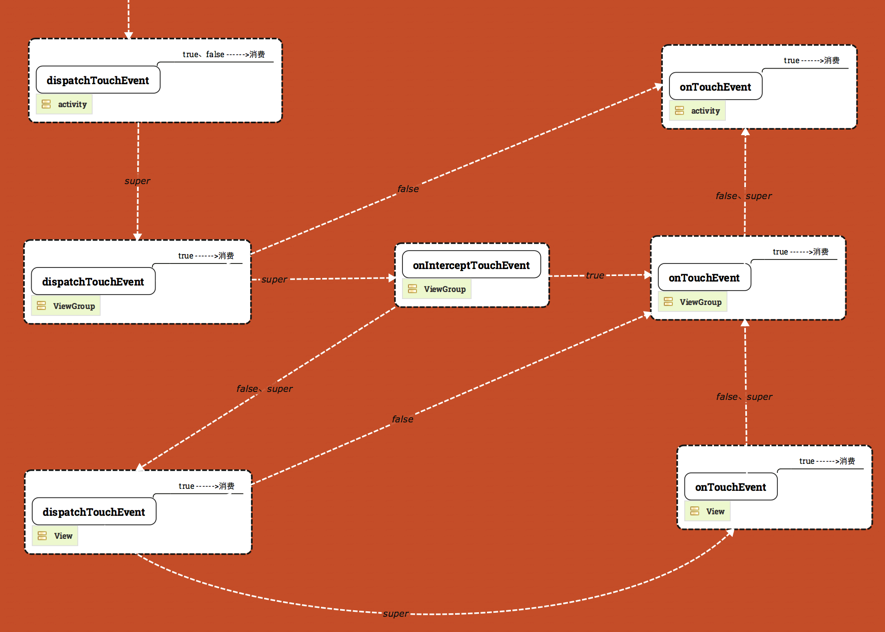
dispatchTouchEvent 决定事件是否分发。TouchEvent 发生时先到顶层 Activity 的 dispatchTouchEvent:返回 true 或 false 表示被自身消费;返回 super.dispatchTouchEvent(ev) 才交给下一层继续分发。
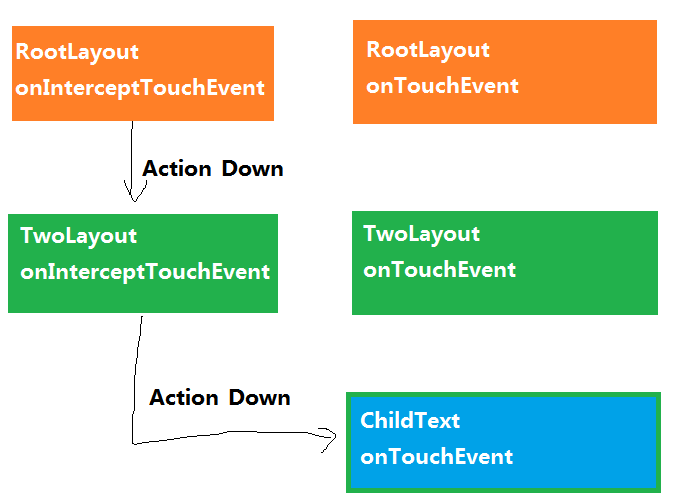
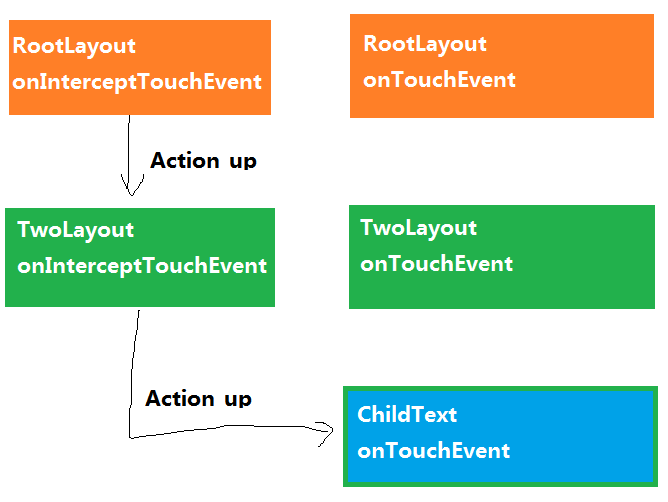
onInterceptTouchEvent 决定是否继续向下传。返回 false 或 super 时传给子 View;返回 true 则拦截,交给当前 ViewGroup 的 onTouchEvent(),这就是 Intercept。
onTouchEvent 处理事件(方向是子 View → 父 View)。返回 true 表示消费,父 View 的 onTouchEvent 不再执行;返回 false 或 super 表示不处理,交给父 View。
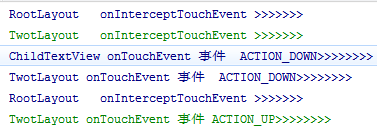
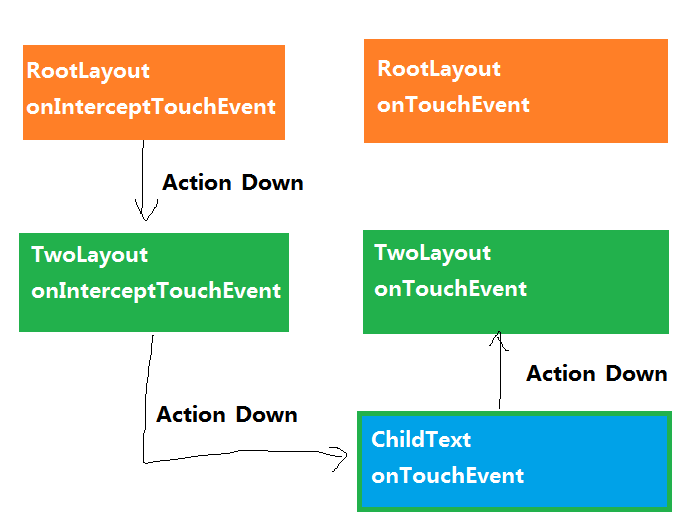
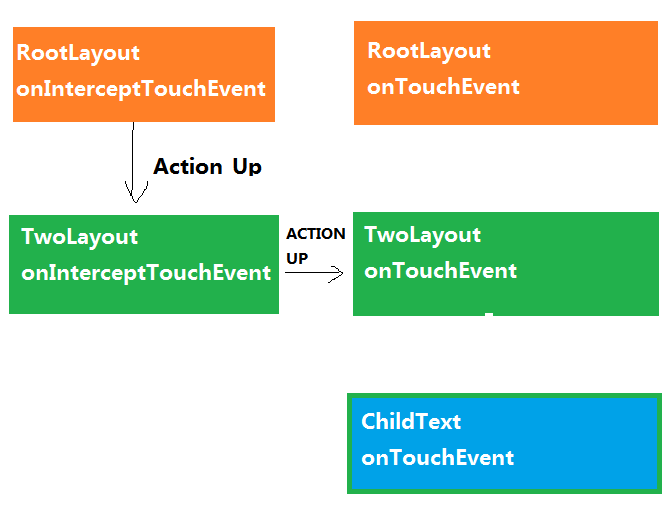
一次点击通常包含 Down、Move、Up。对 ACTION_DOWN 返回 true,表示后续事件我也要;返回 false 表示不关心,交父类。特别注意:ACTION_MOVE / ACTION_UP 的前提是曾经发生过 ACTION_DOWN。没消费 DOWN,系统会当 DOWN 没发生过,后续 MOVE/UP 也抓不到。
| 方法 |
所在层级 |
返回 true |
返回 false / super |
| dispatchTouchEvent |
Activity / ViewGroup / View |
自身消费 |
super:继续往下分发 |
| onInterceptTouchEvent |
仅 ViewGroup |
拦截,交给自己的 onTouchEvent |
不拦截,传给子 View |
| onTouchEvent |
View / ViewGroup |
消费,父级不再处理 |
不消费,回传父级 |
二、示例布局
三层自定义控件:RootLayout → TwotLayout → ChildTextView。
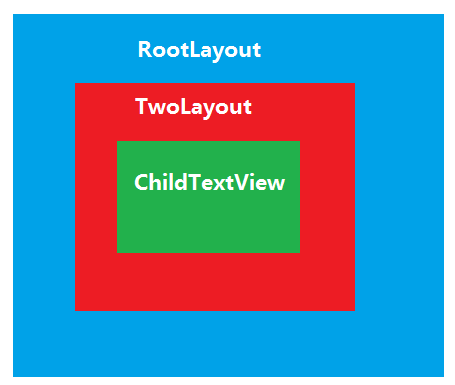
<?xml version="1.0" encoding="utf-8"?>
<com.scxh.android1502.event.RootLayout xmlns:android="http://schemas.android.com/apk/res/android"
    android:layout_width="match_parent"
    android:layout_height="match_parent"
    android:orientation="vertical" >

    <com.scxh.android1502.event.TwotLayout
        android:layout_width="match_parent"
        android:layout_height="match_parent"
        android:orientation="vertical" >

        <com.scxh.android1502.event.ChildTextView
            android:id="@+id/event_text"
            android:layout_width="match_parent"
            android:layout_height="wrap_content"
            android:text="android事件处理机制" />

    </com.scxh.android1502.event.TwotLayout>

</com.scxh.android1502.event.RootLayout>
三、测试代码
public class RootLayout extends LinearLayout {

    public RootLayout(Context context, AttributeSet attrs) {
        super(context, attrs);
    }

    @Override
    public boolean onInterceptTouchEvent(MotionEvent ev) {
        Logs.d("RootLayout   onInterceptTouchEvent >>>>>>>");
        return false;
    }

    @Override
    public boolean onTouchEvent(MotionEvent event) {
        switch (event.getAction()) {
        case MotionEvent.ACTION_UP:
            Logs.i("RootLayout onTouchEvent 事件 ACTION_UP>>>>>>>>");
            break;
        case MotionEvent.ACTION_MOVE:
            Logs.v("RootLayout onTouchEvent 事件   ACTION_MOVE>>>>>>>>");
            break;
        case MotionEvent.ACTION_DOWN:
            Logs.d("RootLayout onTouchEvent 事件  ACTION_DOWN>>>>>>>>");
            break;
        }
        return true;
    }
}
public class TwotLayout extends LinearLayout {

    public TwotLayout(Context context, AttributeSet attrs) {
        super(context, attrs);
    }

    @Override
    public boolean onInterceptTouchEvent(MotionEvent ev) {
        Logs.i("TwotLayout   onInterceptTouchEvent >>>>>>>");
        return false;
    }

    @Override
    public boolean onTouchEvent(MotionEvent event) {
        switch (event.getAction()) {
        case MotionEvent.ACTION_UP:
            Logs.i("TwotLayout onTouchEvent 事件 ACTION_UP>>>>>>>>");
            break;
        case MotionEvent.ACTION_MOVE:
            Logs.v("TwotLayout onTouchEvent 事件   ACTION_MOVE>>>>>>>>");
            break;
        case MotionEvent.ACTION_DOWN:
            Logs.d("TwotLayout onTouchEvent 事件  ACTION_DOWN>>>>>>>>");
            break;
        }
        return false;
    }
}
public class ChildTextView extends TextView {

    public ChildTextView(Context context, AttributeSet attrs) {
        super(context, attrs);
    }

    @Override
    public boolean onTouchEvent(MotionEvent event) {
        switch (event.getAction()) {
        case MotionEvent.ACTION_UP:
            Logs.i("ChildTextView onTouchEvent 事件 ACTION_UP>>>>>>>>");
            break;
        case MotionEvent.ACTION_MOVE:
            Logs.v("ChildTextView onTouchEvent 事件   ACTION_MOVE>>>>>>>>");
            break;
        case MotionEvent.ACTION_DOWN:
            Logs.d("ChildTextView onTouchEvent 事件  ACTION_DOWN>>>>>>>>");
            break;
        }
        return true;
    }
}
四、场景一:子 View 消费 DOWN
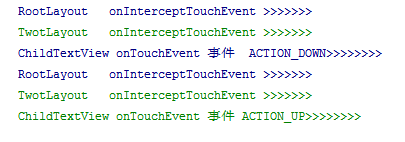
RootLayout、TwotLayout 的 onInterceptTouchEvent 都返回 false(不拦截),ChildTextView 的 onTouchEvent 返回 true,消费第一个 ACTION_DOWN:
五、场景二:子 View 不消费 DOWN
同样不拦截,但 ChildTextView 的 onTouchEvent 返回 false,不消费 ACTION_DOWN:
六、总览图与参考
事件传输更细的讲解推荐 kelin 这篇文章:http://www.jianshu.com/p/e99b5e8bd67b。
参考:
一句话总结:分发向下、拦截在 ViewGroup、处理从子到父;没消费 ACTION_DOWN,后续 MOVE/UP 都不会来。
转载请注明来源:Android事件处理机制

我是周sir,这是我的博客。致力于分享我学会的技术和优秀的文章。微信公众号 “周sir专栏” 欢迎大家关注。